Note: an enhanced and native macOS version is headed to the Mac App Store! It’s already finished.
Sometimes I want to run local web servers for projects I’m working on. Usually more than one at a time, or at least over a short space of time.
So I thought it would be cool to have a controller for those local servers in my menu bar. Sounded like the perfect job for a little scripting and xbar, which is a great way to prove a menubar app idea quickly.
How it works
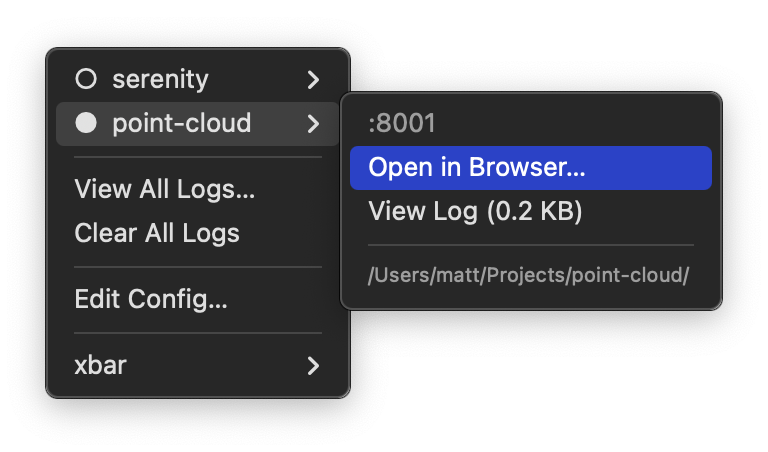
The plugin allows you to:
- toggle servers on and off
- open in browser
- view ports
- view paths
- view log sizes
- clear logs
- edit config
- and more!
Example config
In the config file we set the starting SERVER_PORT, followed by one or more SERVER_DIR for as many projects as you might want servers. We can temporarily comment out those server lines to prevent projects from appearing in the menu.
# .xbar_httpd_config
SERVER_PORT=8000
#SERVER_DIR=~/Projects/starchasers/
SERVER_DIR=~/Projects/serenity/
SERVER_DIR=~/Projects/point-cloud/
Source code
Python source code is available in the following gist:
Originally published: 2026-01-12
--
Enjoyed this blog post? Please buy me a coffee.
--
Comments: Twitter , Bluesky , Mastodon