I spotted Fresh File Explorer, a VS Code extension, on Hacker News and loved the idea—a file sidebar that only shows recently modified files.
The default file sidebar in an editor shows everything, which in a large project is mostly noise. I thought it would be fun to have something like this for Nova, so I reimplemented the concept from scratch using only the OG repo readme as a reference. No code is shared, it’s a completely new extension built against Nova’s API. That means I can’t do as much as the VS Code extension, such as colour coding the files like a heatmap, but it’s still quite useful as it is.
The result is a sort of hybrid filesystem/git/bookmarks sidebar which I’m finding quite pleasant to use.
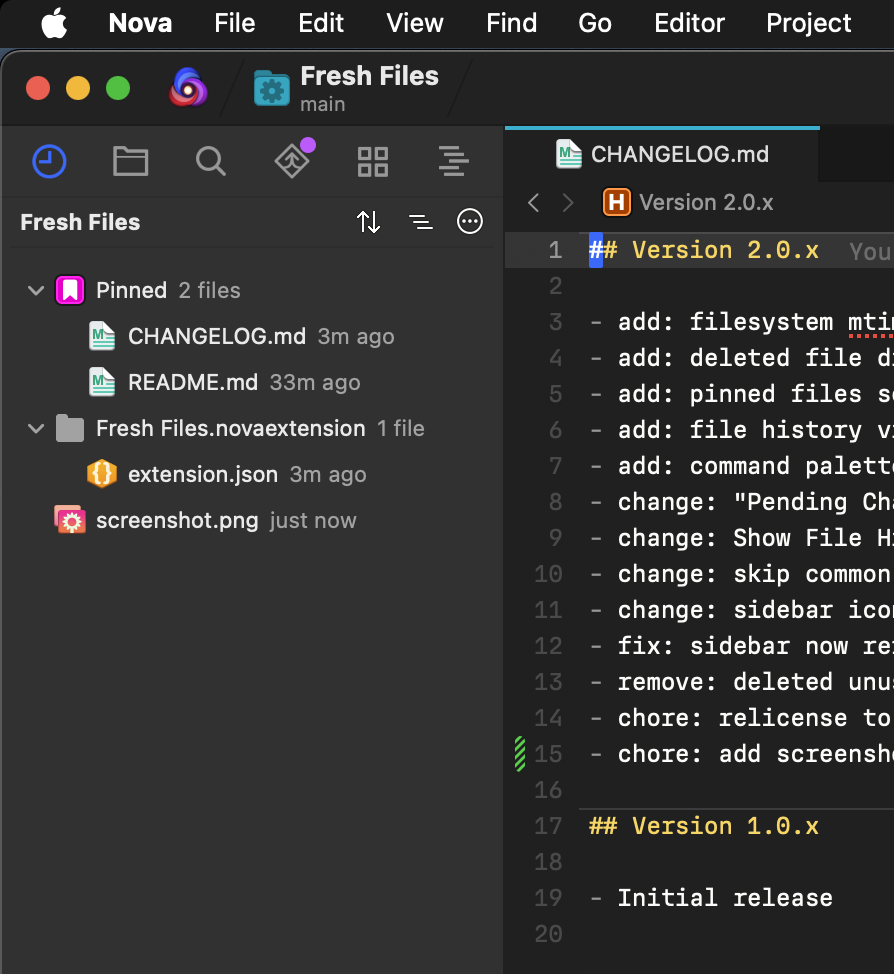
How it works
In Git repositories, Fresh Files uses git status and git log to figure out what’s changed. In non-Git workspaces it falls back to filesystem modification times, so it works in any folder. It shares some functionality with the built-in Git Sidebar but I’ve been careful to not duplicate too much.
There are two modes:
- Pending Changes — shows uncommitted files (or files modified in the last day if there’s no Git)
- Historical — shows files modified within a configurable time window, from 1 hour to 360 days
You can toggle the time window from the sidebar header, the command palette, or project settings.
Features
The sidebar supports both a flat file list and a directory tree view, with sorting by recency or name. Files show relative timestamps like “2h ago” or “3d ago” so you can see at a glance what’s freshest.
Other things worth mentioning:
- Pinned files — pin files to keep them visible regardless of time window
- File history — right-click any file to see its commit history with diffs
- Diff Search (Pickaxe) — find commits where a string was added or removed, file-scoped from the sidebar or repo-wide from the command palette
- Line History — view git history for the current line or selection
- Exhume — view deleted file contents with syntax highlighting
- Resurrect — restore deleted files to their original location
- Show All Files — temporarily show all tracked files, overriding the time window
- Search Fresh Files — full-text search across fresh files from the command palette
- New File — create a new file from the sidebar context menu
- Move to Trash — delete files from the sidebar context menu
- Quick Open — fuzzy-open from just the fresh files via the command palette
- Deleted file indicators — deleted files show up with a distinct icon
- Auto-refresh — the sidebar updates after saves, git commits, checkouts, and merges
Context menu
Right-click gives you New File, Show in Finder, Copy Path, Copy Relative Path, Move to Trash, Pin/Unpin, Show File History, Diff Search, and Exhume/Resurrect for deleted files.
Get it now
You can install it at: extensions.panic.com/extensions/com.gingerbeardman/com.gingerbeardman.FreshFiles/
Help keep this blog running with a coffee donation!
--
Comments: Twitter , Bluesky , Mastodon